Can a mockup become a print-ready file automatically?
A mockup can become a cleaner artwork reference, but final print readiness still requires review for resolution, transparency, scale, color, file format, print method, and buyer approval.
Guide page
A garment mockup can look finished on screen while the real production file is still missing. Designers, factories, print shops, exporters, and merch teams often receive a hoodie mockup, jersey photo, WhatsApp screenshot, old catalog image, or buyer sample photo and then have to recreate the artwork for DTG, DTF, screen print, embroidery, sublimation, labels, packaging, or a tech-pack handoff. Ayzelify Print Lift helps recover useful artwork direction from those product images. The important distinction is that extraction is not the same as final approval: the lifted result should become a cleaner reference for redraw, vectorization, scale review, color review, buyer approval, and print-file preparation. Current Google image guidance favors accurate image context, descriptive alt text, and helpful surrounding content. Google helpful-content guidance reinforces that pages should solve a real user problem. Shopify product media guidance focuses on product images helping customers understand the item, while Printful print-file guidance emphasizes practical constraints such as DPI, file size, transparency, and product-specific print requirements. This guide explains how to use Ayzelify's Mockup to Print-Ready Design Extractor workflow without overstating what a single AI extraction can safely do.
A mockup-to-print-ready workflow extracts the visible artwork direction from a garment mockup or product photo, checks it against the source image, then sends it through cleanup, redraw, vectorization, scale, color, print-method, and buyer-approval review before production. Ayzelify Print Lift speeds up the recovery stage, but final print readiness still requires human and production checks.
A garment mockup is not automatically a production file. It may hide artwork edges, scale, resolution, repeat behavior, color values, transparency, or print-method constraints.
Ayzelify Print Lift helps extract cleaner artwork direction from mockups and product photos so designers and factories can review, redraw, vectorize, and prepare final files faster.
The strongest workflow separates recovery, cleanup, vectorization, print-file preparation, buyer approval, and factory handoff instead of treating one generated image as final production evidence.
Designers should compare the extracted result against the source mockup for missing text, warped logos, broken paths, color shifts, poor edges, and incorrect placement.
SEO and GEO value comes from explaining the workflow clearly with accurate image context, internal links, FAQs, captions, and honest production language.
A mockup tells the team what the design is supposed to look like, but it usually does not contain everything a print operator needs. It may hide the true artwork edges, scale, transparency, color values, repeat behavior, or resolution.
Ayzelify Print Lift is useful because it helps recover a cleaner artwork reference from that visual evidence. The practical output is a better starting point for review, cleanup, redraw, vectorization, and production discussion.
A chest print, sleeve graphic, logo badge, typography layout, seamless pattern, and sublimation panel each fail in different ways. Choosing the target before extraction helps the tool and the reviewer focus on the right details.
For typography, inspect letter shapes and counters. For logos, inspect proportions and negative space. For all-over artwork, inspect repeat direction, scale, seams, and edge behavior. The target determines the review checklist.
Most production risk appears in small details: missing letters, rough edges, incorrect curves, filled negative space, broken outlines, changed icons, and color shifts. These details may look minor in a product image but become obvious on a printed garment.
The safest workflow compares the extracted artwork beside the source mockup. Mark what is usable, what must be redrawn, what needs Vectorize, and what requires buyer confirmation before the file moves forward.
Some extracted artwork can stay raster if the final use is a product visual or a reviewed transparent print file at the correct dimensions. Other artwork needs vector cleanup because logos, badges, embroidery shapes, vinyl cuts, and large-scale graphics need cleaner paths.
Ayzelify works best when Print Lift and Vectorize are treated as linked production steps. First recover the visible artwork direction, then decide whether the next stage is raster cleanup, manual redraw, vector conversion, or a print operator's file-prep workflow.
Print-file guidance from production platforms and print shops commonly comes back to practical checks: DPI, pixel dimensions, transparency, print area, file format, garment color, gradients, and method-specific limits. DTG, DTF, screen print, embroidery, sublimation, woven labels, and patches do not need the same file decisions.
Before sampling, confirm the file role and the method. A buyer-approval reference, ecommerce graphic, vector handoff, embroidery file, sublimation panel, and final transparent print file should not be reviewed as if they are the same deliverable.
Once the artwork has been reviewed, it can support more than sampling. The same approved reference can update a tech pack, buyer deck, product listing, catalog image, alt text, social post, ad creative prompt, and ecommerce image caption.
This is where Ayzelify is different from a generic image generator. The recovered artwork direction can connect to product visuals, Vectorize, tech packs, listing generation, and marketplace content while keeping the source mockup and approval notes visible.
Ayzelify helps designers, print shops, exporters, and factories recover usable artwork direction from mockups and garment photos, then connect that reference to cleanup, Vectorize, tech-pack notes, listing content, and buyer approval.
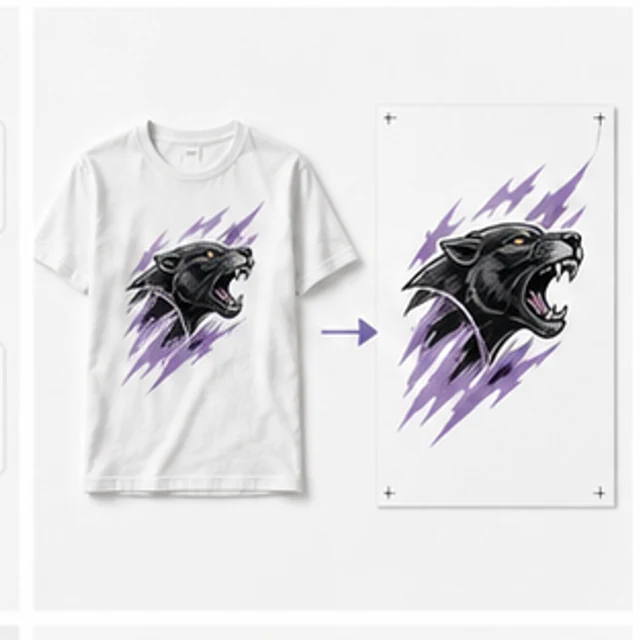
A mockup can become a cleaner artwork reference, but final print readiness still requires review for resolution, transparency, scale, color, file format, print method, and buyer approval.
Print Lift can help isolate visible artwork direction such as chest prints, sleeve graphics, logos, typography, badges, all-over patterns, and sublimation layouts from garment mockups or product photos.
Use Vectorize or manual redraw when the extracted artwork includes logos, text, line art, embroidery shapes, cutting paths, or graphics that need cleaner scalable paths before production.
Straight-on, high-resolution images with visible artwork edges, low compression, clear lighting, minimal wrinkles, and limited perspective distortion usually produce stronger extraction references.
Use Ayzelify to generate product visuals, ecommerce content, and buyer-ready assets, then review every output before publishing.