Ayzelify home
Guide page
AI Product Design Generator Guide for Apparel Teams
Apparel product design is not only a prompt-to-image task. A real apparel team has to decide the product category, silhouette, buyer market, fabric direction, trim details, logo placement, color story, front and back views, construction cues, price position, sample feasibility, and how the design will later become a catalog image, model photoshoot, listing, tech-pack note, or buyer presentation. Ayzelify is built for that connected workflow. It helps exporters, factories, apparel brands, streetwear founders, sportswear teams, teamwear suppliers, leather businesses, and ecommerce sellers turn prompts, references, colors, category logic, and brand direction into reviewable product concepts. Google image guidance emphasizes that images should be supported by useful page context, descriptive filenames, helpful alt text, and high-quality visuals. Google Product structured data guidance shows why ecommerce product facts such as image, price, availability, sizing, shipping, and returns need consistency when a concept becomes a product page. Shopify and WooCommerce product-media guidance both separate product images and galleries as part of the product presentation workflow. This guide explains how apparel teams can use Ayzelify AI Product Design Generator to create stronger product directions while keeping brand accuracy, material claims, logo use, buyer expectations, and production feasibility under human review.
Start designing products
Short answer
An AI product design generator for apparel should create reviewable concept directions, not final unverified production promises. Start with product category, buyer, fabric, color, logo, silhouette, construction notes, and reference images; generate front/back/detail directions; then review accuracy before moving the concept into sampling, photoshoot, listing, tech-pack, or buyer catalog workflows.
Why this matters
Apparel design generation should begin with a product brief: category, buyer, fabric direction, silhouette, colors, logo placement, trims, size range, price position, and intended selling channel.
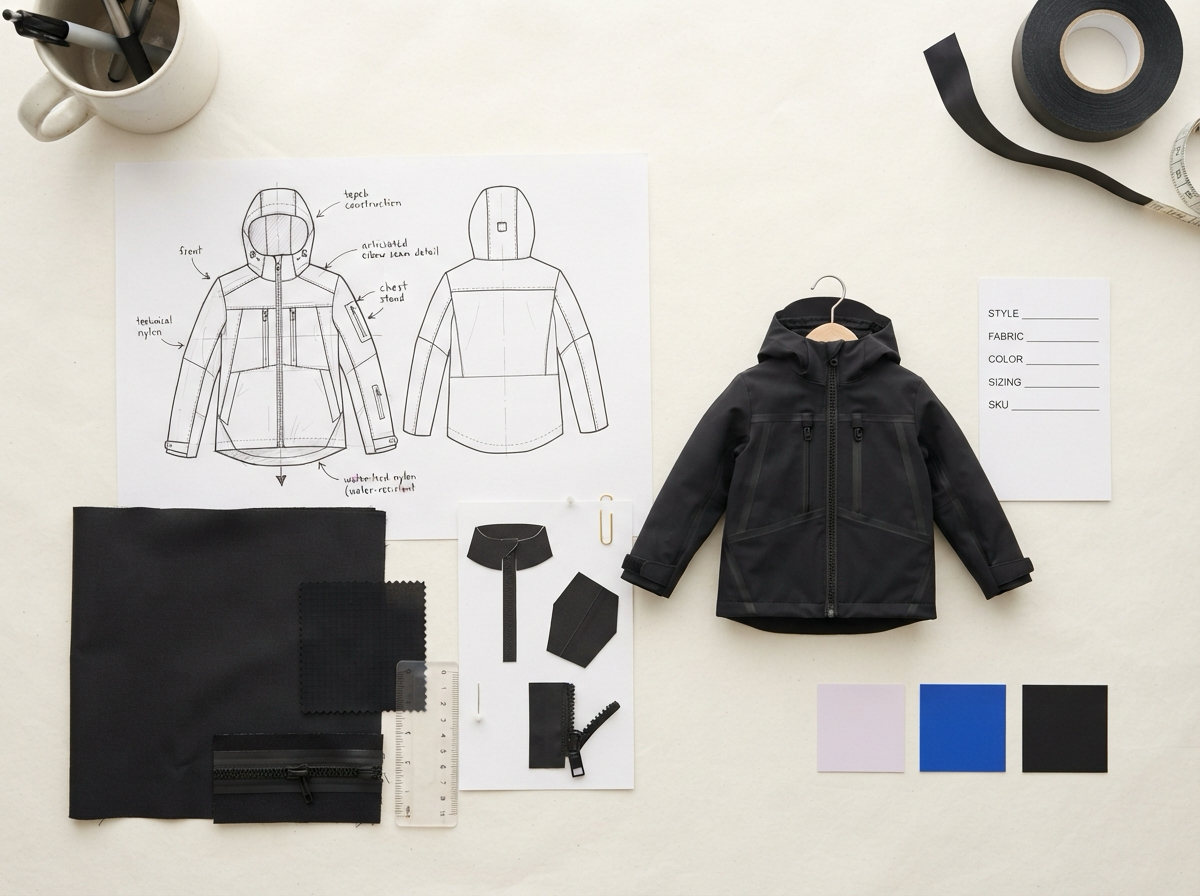
A useful output is a reviewable design direction with front view, back view, detail notes, color options, material intent, and downstream use cases for catalog, photoshoot, listing, and tech-pack work.
Category-specific logic matters. A rashguard, varsity jacket, hunting jacket, teamwear kit, leather jacket, hoodie, bag, or fitness garment needs different construction and buyer-proof details.
SEO and GEO value comes when approved design concepts become clear ecommerce assets: descriptive image context, product-page copy, structured-data-ready facts, internal links, and buyer-answer summaries.
Human review is still required for material truth, logo fidelity, production feasibility, size specs, compliance-sensitive claims, buyer logos, delivery promises, and final manufacturing decisions.
Practical guide
Design generation starts with a product brief
A strong apparel concept needs more than a style adjective. The team should define the product category, buyer, use case, fabric direction, color palette, logo placement, trim details, fit, and target channel before generation starts. This makes the output easier to judge and easier to move into sampling or launch work.
Ayzelify turns that brief into visual directions the team can compare. The practical goal is not to produce one random image. It is to create concepts with enough structure for merchandising, sales, ecommerce, and production teams to discuss the same product clearly.
Use category-specific design logic
A hoodie, rashguard, football kit, leather jacket, hunting shell, fight short, BJJ gi, and bag should not share the same design rules. Each product category has different panels, closures, trim priorities, buyer questions, photo needs, and production constraints. Category-specific logic is what makes a concept feel usable rather than decorative.
For exporters and manufacturers, this matters because buyers often evaluate feasibility from the first visual. A design that shows the right seams, views, branding zones, and material cues can move a conversation forward faster than a vague moodboard.
Generate reviewable views, not isolated artwork
Apparel teams need views they can inspect: front, back, side, closeup, colorway, label, print placement, and presentation visuals where relevant. A single hero image may look good but still fail as a design handoff if the back view, trims, construction, or logo treatment are unclear.
Ayzelify connects product design to downstream workflows. Once a concept is approved, the same direction can feed catalog images, model or mannequin photoshoots, product listings, social assets, and tech-pack starting notes. That continuity is the value.
Protect logo, material, and construction truth
A generated concept can suggest fabric texture, trim placement, stitching, embossing, print zones, and embroidery, but the team must still confirm what can actually be produced. Material composition, waterproofing, compression, flame resistance, medical or safety claims, and certification language should never be inferred from an attractive image.
Logo handling also needs discipline. If a logo appears on a product, it should be generated into the fabric, embroidery, label, leather embossing, print, or hardware perspective. A flat pasted mark can make the product look finished while hiding whether the design actually works.
Turn approved concepts into launch-ready commerce assets
A product concept becomes more valuable when it can travel into the rest of the launch workflow. The approved design should support product gallery images, model or ghost mannequin views, listing titles, descriptions, buyer FAQs, product specifications, ad creatives, social captions, and tech-pack notes.
This is where SEO and GEO signals become practical. When the visual concept, alt text, product copy, structured-data-ready facts, and internal links all describe the same item, product pages and catalog content become easier for buyers and search systems to understand.
Review before sampling, publishing, or buyer presentation
Before sending a design to a buyer or production team, review the product category, fit, proportions, front/back consistency, panels, pockets, trims, decoration method, logo placement, colors, and construction cues. Then decide what is confirmed and what still needs sampling or costing.
For apparel teams, the safest workflow is concept, review, refine, sample brief, commerce asset generation, and final verification. Ayzelify helps compress the creative and content work, but the product team still owns truth, feasibility, and buyer trust.
Common questions
What is an AI product design generator for apparel?
It is a workflow for creating reviewable apparel concept directions from a product category, prompt, reference image, brand direction, colors, logo placement, material intent, and buyer context. The output should be reviewed before sampling or publishing.
Can AI-generated apparel concepts go straight to production?
Not responsibly. A generated concept should become a sample brief or design direction first. Production teams still need to confirm pattern, sizing, materials, trims, decoration methods, costs, MOQ, lead time, and feasibility.
How should apparel teams use logos in generated designs?
Use the logo as a reference so it is integrated into fabric, embroidery, print, label, leather embossing, or another real product surface. Do not paste a flat logo onto a finished product image.
How does product design generation support SEO and GEO?
Approved concepts can become product pages, catalog images, listing copy, alt text, FAQs, internal links, and structured-data-ready facts. Search and answer engines benefit when the visual, page copy, and product facts stay consistent.