Why this matters
Generic AI image generators are strong for open-ended ideation, style exploration, scene creation, image editing, and one-off visual work.
Ayzelify is designed around a commercial product record and the linked outputs required to design, present, list, manufacture, market, and publish that product.
The most important comparison factors are input structure, product-category controls, multi-view planning, downstream outputs, brand continuity, marketplace support, review boundaries, and team handoff.
A general image model may be the better choice for a single creative image; Ayzelify becomes more useful when one approved product must become a catalog, listing, tech-pack draft, artwork package, and campaign system.
Both workflows produce probabilistic AI output. Product fidelity, logos, measurements, materials, certification, compliance, pricing, MOQ, lead time, and production instructions need human review.
Practical guide
Generic image generators are strong creative tools
A fair comparison starts by recognizing how capable general image systems have become. OpenAI's current image documentation covers original generation, conversational editing, and the use of image inputs. Adobe Firefly documents style references, subject or object references, and generative edits. Midjourney documents image prompts, style references, and object or subject reference controls, while also warning that intricate details such as logos may not perfectly match a reference. These tools can be excellent for moodboards, campaign concepts, environments, visual styles, one-off edits, illustrations, and rapid exploration across almost any subject.
That breadth is the advantage. A general tool does not need to know whether the user is designing a rashguard, surgical forceps, a leather bag, a hunting jacket, or an abstract poster before it can begin. A skilled operator can prompt, upload references, iterate, and assemble strong images. Teams with designers, copywriters, production experts, and a separate asset-management process may prefer that flexibility.
The tradeoff is that the operator defines and manages the workflow around the model. The team decides which views are needed, rebuilds context between steps, names the files, writes the product data, checks consistency, prepares marketplace fields, creates production documents, and moves assets into other systems. For one image, that may be exactly right. For fifty SKUs and six downstream channels, coordination becomes the larger job.
Ayzelify starts with the product job and downstream outputs
Ayzelify narrows the problem. It is built for product teams that know the image is part of a longer commercial path. The starting point can be a product idea, buyer brief, existing garment, sample photo, logo, artwork, or old catalog image. The workflow then asks category and channel questions so the next output can be planned as a product asset rather than an isolated visual.
For apparel and equipment, that may include product category, front and back requirements, colorways, trims, decoration, buyer, model or mannequin direction, and marketplace destination. For bags, surgical instruments, beauty tools, and sports equipment, the useful controls and views change. Ayzelify uses focused studios and category structures to make those differences visible. This does not guarantee fidelity, but it gives the team a more relevant brief and review checklist.
The important unit of work is the product record. One selected direction can feed catalog views, model context, listing copy, technical notes, campaign assets, and export files. When the product changes, the team can identify which connected assets need review. A generic generator can participate in that process, but Ayzelify is organized around it.
Compare a single image with a coordinated product image system
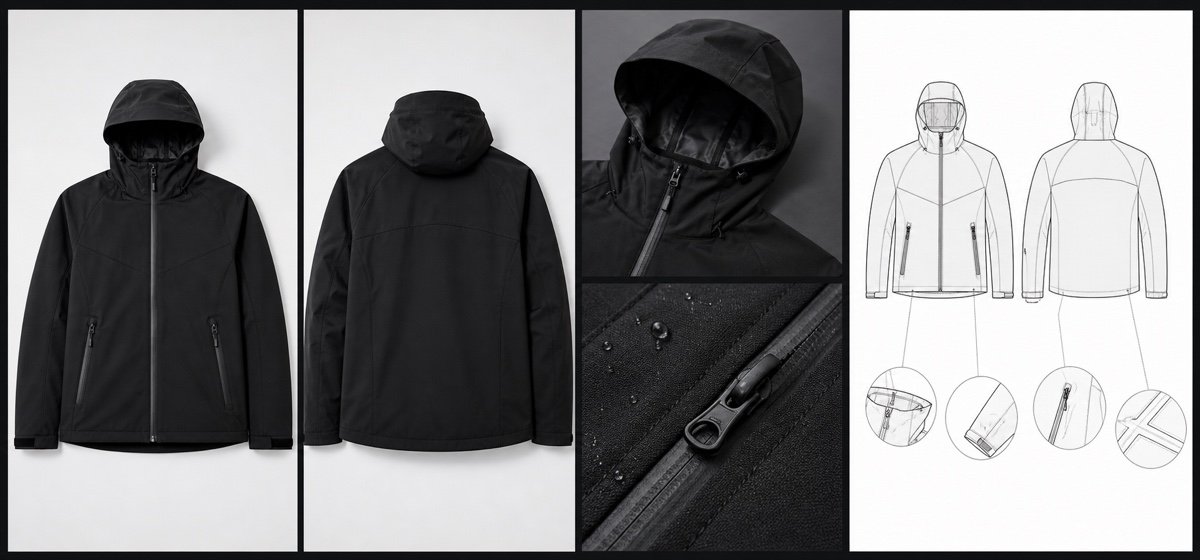
A strong hero image is not a complete ecommerce gallery. Product buyers may need a front view, back view, side profile, closeup, material detail, colorway, scale, packaging image, ghost mannequin view, model context, lifestyle scene, and promotional crop. Each image has a different job. Clean catalog views support inspection; model images communicate fit and scale; lifestyle images support merchandising; detail crops answer construction questions.
Ayzelify separates these jobs across Collection Studio, Virtual Photoshoot, Photoshoot Studio, Ghost Mannequin, UGC Lifestyle, and specialist physical-product workflows. Selected model or mannequin context can be reused where the feature supports it. The goal is a planned set, not a promise that every generated pixel will match. Teams still need to compare silhouette, seams, color, logo integration, material appearance, hardware, and scale with the approved product.
With a generic generator, a capable user can request the same views and may achieve excellent results. The difference is operational: prompts, references, naming, output coverage, and approval logic are assembled by the user. Choose based on whether creative freedom or a repeatable product-gallery process is the bigger requirement.
The largest difference appears after image generation
Product work continues after the image is selected. A marketplace listing needs a title, buyer-focused bullets, description, specifications, variants, customization options, image sequence, FAQs, packaging, MOQ context, lead-time guidance, and category fields. A factory handoff may need front and back drawings, measurements, BOM, materials, construction notes, trims, artwork placement, labels, packaging, tolerances, and comments. Marketing needs channel-specific formats and copy.
Ayzelify links image workflows to Listing Generator, Alibaba preparation, tech-pack drafts, Marketing Forge, Social Studio, Print Lift, Vectorize, Brand Studio, Material Studio, and selected WooCommerce or WordPress publishing flows. Print Lift can help isolate authorized artwork from a garment image; Vectorize can prepare a trace and export path for review; Alibaba workflows can organize product images and B2B listing fields. These are different tasks from generating a scene.
None of these outputs should bypass specialists. A generated tech pack is a starting document, not production authority. A marketplace draft does not prove MOQ, price, stock, lead time, certification, or compliance. A traced logo may need curve and typography correction. Ayzelify's benefit is that these handoffs exist inside the product workflow and can be reviewed together.
Use workflow evidence instead of feature-count marketing
A long feature list is not enough to choose software. Google recommends that comparison and review content evaluate products from the user's perspective, provide evidence, explain benefits and drawbacks, identify the most important decision factors, and clarify which option is best in different circumstances. Apply the same standard here: start with one real product and trace every required deliverable from input to approval.
Test how each option handles the source reference, product category, logo, front and back agreement, color, material appearance, details, model context, image sequence, listing copy, specifications, export formats, revisions, and team handoff. Count the manual steps and the places where facts must be re-entered. Also record what the tool does not do. A beautiful demo should not hide missing marketplace fields or unresolved production information.
Ayzelify is likely the stronger fit when teams repeatedly build catalogs, buyer presentations, marketplace listings, apparel or specialist product assets, and launch content. A general generator may remain the stronger fit for broad artistic exploration, unusual visual styles, experimental concepts, and teams that already have mature production and content systems around the model.
The best answer may be a controlled hybrid workflow
Teams do not have to make an exclusive choice. A generic generator can support early mood, environment, illustration, or campaign exploration. Ayzelify can take the approved product direction into a structured catalog, photoshoot, listing, technical, artwork, and launch workflow. A dedicated vector editor, marketplace dashboard, PLM system, photographer, pattern maker, compliance specialist, or factory team may still own the final professional step.
The control point is one verified product record. Store the approved product facts, reference images, artwork rights, dimensions, materials, construction, color standards, model permissions, packaging, marketplace requirements, and evidence status. Every tool receives only the information needed for its stage, and every output returns to the same review process. That prevents an exploratory image from quietly becoming an inaccurate listing or production promise.
Choose Ayzelify when workflow compression is the value: fewer disconnected briefs, clearer category outputs, and a shorter path from product idea to reviewable commercial assets. Choose a generic image generator when maximum creative breadth is the value. Use both when the roles are explicit. In every case, approve the product before you ask the buyer, customer, printer, marketplace, or factory to trust it.