Ayzelify home
Guide page
AI Bag Design Generator Guide
Bag design is judged through shape, scale, material, hardware, compartment logic, carrying comfort, and use context. A backpack, gym duffel, tote, sling, laptop bag, weekender, dry bag, tactical pack, cooler bag, or travel case can look attractive in one hero image and still fail buyer review if the side profile, strap construction, zipper path, bottom panel, interior access, pocket layout, volume, scale, and material claims are unclear. Google Product structured data guidance shows why ecommerce pages should keep product facts such as images, price, availability, shipping, returns, variants, and reviews consistent when eligible for richer search presentation. Google Merchant product data guidance also treats clear product titles, descriptions, images, material, size, color, availability, and landing-page consistency as operational inputs for shopping surfaces. For leather and imitation leather bags, FTC leather guidance warns against misleading composition claims and says non-leather content should be disclosed when material appears to be leather but is not. This guide explains how bag manufacturers, accessories brands, Sialkot exporters, Shopify teams, Alibaba sellers, and private-label operators can use Ayzelify AI Bag Design Generator to create reviewable bag concepts and move approved directions into photoshoot, listing, catalog, and production-handoff assets without inventing leather, capacity, waterproofing, recycled-content, durability, origin, or performance claims.
Create bag concepts
Why this matters
Bag design needs category-specific structure: silhouette, dimensions, capacity context, compartments, straps, handles, zipper paths, hardware, lining, bottom panel, and material finish.
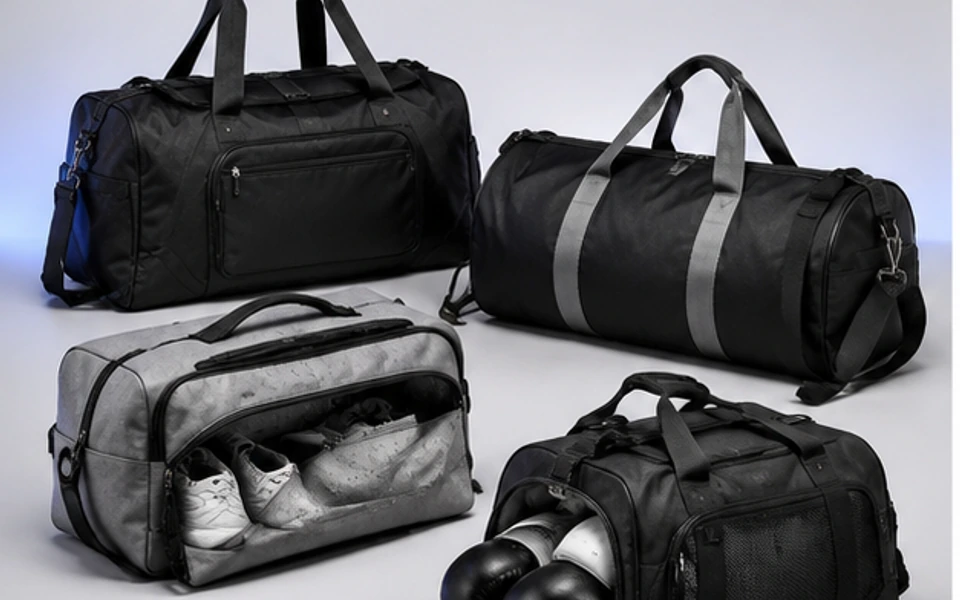
A reviewable AI output should include product-only views, angle views, interior or open-compartment views, detail closeups, scale references, and use-context visuals.
Bag copy should not invent genuine leather, vegan leather, waterproofing, recycled content, RFID blocking, airline carry-on compliance, capacity, load rating, or durability claims without proof.
Marketplace readiness depends on consistent titles, descriptions, images, material, color, size or dimensions, variants, price, availability, shipping, returns, and landing-page facts.
SEO and GEO value comes from specific bag-category language, helpful FAQs, internal links, alt text, Product structured data awareness, and answer-ready summaries instead of generic accessory prompts.
Practical guide
Start with the bag type and buyer job
A credible bag concept starts with the job the bag is supposed to do. A gym duffel needs different visual proof than a laptop backpack, tote, sling, wet-dry bag, tactical pack, weekender, school bag, cooler backpack, or sports equipment bag. The brief should state the product type, buyer, carry method, sales channel, and whether the output is for concept review, ecommerce, Alibaba, Shopify, Amazon, Etsy, or buyer presentation.
The first structure to lock is silhouette. Is it boxy, rounded, barrel-shaped, slim, collapsible, framed, hard-sided, soft-sided, expandable, or minimal? From there, define dimensions, capacity context if verified, strap and handle setup, access method, pockets, organizer zones, laptop sleeve, shoe compartment, wet pocket, lining, bottom construction, and hardware.
Ayzelify works best when the bag is described as a real product with construction constraints. A prompt that says only stylish backpack will produce decoration. A prompt that says 24 liter laptop backpack, padded shoulder straps, side bottle pocket, front organizer, luggage pass-through, matte black nylon direction, front logo patch, front, back, side, interior, and scale views gives the output a product system.
Use angle and compartment views to reduce uncertainty
A single front hero image rarely explains a bag. Buyers want to know how wide it is, how the side panel is built, whether the base is reinforced, where the zipper opens, how the straps attach, how the handles stand, and whether the bag looks the right size on a body or next to a familiar object. That is why angle views and scale references matter.
For backpacks, include front, back, side, open-top or clamshell view, strap detail, laptop sleeve, organizer pocket, and bottle pocket. For duffels, include front, side, top opening, shoe compartment, wet pocket, shoulder strap, handle wrap, bottom panel, and internal lining. For totes and fashion bags, include handle drop, side gusset, closure, interior pocket, lining, hardware, base, and on-body scale.
Generated images should be named by purpose during review: concept image, product-only front, side angle, interior view, pocket detail, hardware macro, material closeup, scale reference, or campaign scene. That prevents a lifestyle image from being mistaken for a specification view.
Treat material and performance wording as review fields
Bag listings often become risky when the visual direction outruns the facts. A generated material may look like leather, coated nylon, ballistic fabric, canvas, suede, mesh, neoprene, or rubberized trim, but the real product still needs verified composition. Leather and imitation leather wording should be reviewed carefully, especially for US-facing marketing where FTC leather guidance addresses misleading composition claims.
The same discipline applies to performance wording. Do not claim waterproof, water-resistant, recycled, vegan leather, RFID-blocking, anti-theft, airline approved, insulated, impact protective, load bearing, scratch resistant, antimicrobial, or heavy-duty unless the supplier can support it. A visual can show a roll-top dry bag direction; it does not prove waterproof construction.
A practical review table should separate visual intent from verified facts: material direction, confirmed composition, trim material, zipper brand if known, hardware finish, dimensions, weight, capacity, lining, care, origin, packaging, MOQ, and warranty or return language.
Create ecommerce data that matches the images
Search and shopping systems need consistent product information. If the image shows a black laptop backpack with side bottle pockets and a front organizer, the title, description, alt text, product type, color, material, dimensions, variants, price, availability, shipping, return policy, and structured data should not describe a different item. Google guidance around Product structured data and Merchant product data makes this consistency an operational requirement, not only an SEO preference.
For bag pages, write titles that identify the product clearly: brand or collection if owned, bag type, material or material direction when verified, primary use, color, and size or capacity if confirmed. Keep promotional language out of product titles and do not bury essential attributes in long generic copy.
Ayzelify can help turn the approved concept into listing drafts, image alt text, gallery captions, feature bullets, and FAQ answers. The strongest workflow still has a human compare the copy against the real product before the listing goes live.
Move approved bag concepts into production and sales review
Once a bag concept is approved visually, the useful work is only half done. The team still needs a production handoff: measurements, pattern notes, shell fabric, lining, interfacing, zipper length, zipper pullers, hardware, webbing, labels, reinforcement points, stitch comments, color standards, logo method, packaging, MOQ, carton notes, and QC checks.
Sales teams need a different package: hero image, angle gallery, detail views, scale image, clean title, short description, feature bullets, specification table, customization options, sampling note, lead-time context, and buyer questions. B2B buyers want clarity before they send an RFQ; DTC shoppers want enough proof to understand the size, feel, and function.
Ayzelify is strongest when the same approved bag direction feeds concept design, photoshoot planning, listing copy, catalog output, and tech-pack preparation. That keeps the product story aligned from first visual to buyer review.
Common questions
What should an AI bag design generator include?
It should include the bag category, silhouette, dimensions, scale, carry method, straps, handles, pocket layout, compartment access, zipper paths, hardware, material finish, colorways, branding zones, and the views needed for ecommerce or buyer review.
Can AI-generated bag images be used directly in listings?
They can support concepts, gallery planning, ads, buyer presentations, and reviewed listing assets, but the final page should not misrepresent material, capacity, dimensions, construction, stock status, performance, or the actual product being sold.
Which views are most useful for bag ecommerce pages?
A useful bag gallery includes front, back, side, three-quarter angle, top opening, interior, pocket detail, strap detail, hardware closeup, material closeup, bottom view, scale reference, and use-context images.
What bag claims need human approval?
Material composition, leather or imitation leather wording, recycled content, waterproofing, load rating, capacity, RFID blocking, anti-theft features, airline carry-on fit, durability, insulation, origin, and care instructions should be verified before publication.