Ayzelify home
Guide page
Surgical Instrument Listing Workflow for Exporters
Surgical instrument listings are high-inspection B2B product pages. A buyer may compare forceps, scissors, clamps, retractors, needle holders, dental instruments, orthopedic tools, ophthalmic tools, ENT instruments, veterinary instruments, and general surgery sets by geometry, finish, handle style, tip shape, serration, jaw alignment, box lock, ratchet, scale, packaging, labeling, and documentation readiness before asking for a quote. Google Product structured data guidance shows why product pages should keep visible details, images, offers, availability, shipping, returns, variants, reviews, and page facts consistent when pages are eligible for richer search presentation. Google Merchant product data guidance also treats title, description, image, material, condition, availability, and landing-page consistency as operational inputs for shopping visibility. Medical-device listings add a stricter review layer: FDA device guidance explains that many device products can involve registration, listing, labeling, classification, and Unique Device Identification responsibilities depending on market and product type. This guide explains how surgical exporters, Sialkot instrument manufacturers, private-label medical suppliers, distributors, Alibaba sellers, Shopify B2B teams, and catalog operators can use Ayzelify AI Surgical Instrument Listing Generator to create buyer-ready listings while keeping regulatory status, sterile/non-sterile wording, material grade, intended use, certification, and market-access claims under human approval.
Prepare surgical listings
Why this matters
Surgical instrument listings need white-background product views, macro inspection images, structured specifications, and careful claim review.
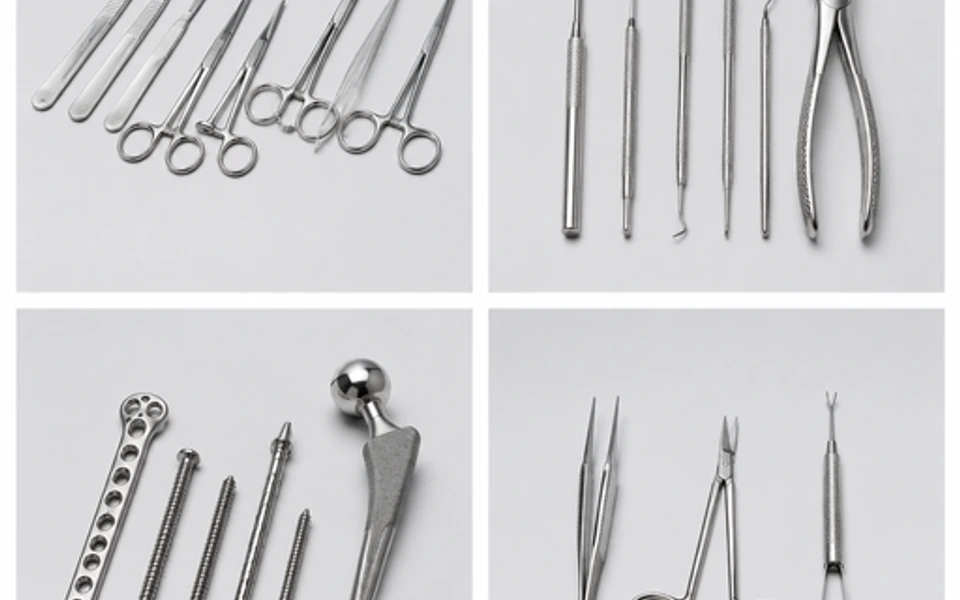
Buyer-ready image sets should show full instrument shape, tip, jaw, serration, hinge, ratchet, handle, finish, scale, packaging, and labeling when available.
Product copy should not invent stainless-steel grade, sterile status, intended surgical use, CE, FDA, ISO, reusable status, autoclavable claims, passivation, hardness, or origin without proof.
Marketplace and catalog readiness depends on consistent titles, descriptions, product identifiers, material fields, condition, availability, shipping, returns, images, and landing-page facts.
SEO and GEO value comes from precise instrument language, answer-ready summaries, internal links, useful FAQs, alt text, Product structured data awareness, and human-reviewed compliance boundaries.
Practical guide
Start with instrument family and confirmed product facts
A surgical listing should begin with the exact instrument family. Forceps, scissors, clamps, needle holders, retractors, probes, elevators, curettes, dental tools, orthopedic instruments, ophthalmic tools, ENT instruments, veterinary instruments, and procedure sets each require different image and specification priorities.
The brief should separate confirmed facts from review fields. Product name, SKU, length, pattern, tip shape, jaw type, blade type, handle style, finish, packaging, and included items are practical starting points. Material grade, sterile status, intended use, regulatory status, and certification language should stay under documentation review.
Ayzelify works best when the listing brief states the buyer channel, product family, specification fields, required image views, and claims that must not be generated as facts.
Build a white-background gallery buyers can inspect
Surgical product buyers need images that support comparison. A clean white-background gallery should show the full shape, scale, profile, and finish of the instrument before any branded catalog layout or sales presentation.
For small precision tools, macro detail is not optional. Tips, jaws, serrations, blades, hinges, box locks, ratchets, spring action, handle texture, surface finish, markings, and packaging details can influence whether the buyer trusts the SKU enough to request pricing.
Generated images should be reviewed against the real sample or approved product file. A good macro image can make the tool readable, but it does not prove material grade, hardness, passivation, sterility, corrosion resistance, or clinical suitability.
Write specifications that help B2B buyers quote faster
A strong surgical listing answers buyer questions before the inquiry. The product page should make the product family, SKU, size, length, pattern, finish, included items, packaging, MOQ, sample availability, lead time, and documentation status easy to scan.
The safest copywriting pattern is to describe visible and verified details first. Tip shape, jaw profile, handle type, lock type, finish, size range, and package contents can be useful when confirmed. Market-access language belongs in a review field until documentation supports it.
For exporters, this reduces back-and-forth. Buyers can compare SKUs, ask sharper questions, and move into RFQ or sample discussion without relying on vague catalog text.
Keep SEO data and medical-device wording consistent
Search visibility depends on consistency. If the gallery shows a stainless-finish clamp with a specific jaw shape and ratchet, the title, description, image alt text, product identifiers, material field, condition, availability, shipping, returns, and landing-page facts should describe that same SKU.
Google Product structured data and Merchant product data guidance both point toward consistent product facts across the page, feed, images, and buyer-facing content. For surgical instruments, that consistency also protects buyer trust because the products are evaluated more carefully than ordinary accessories.
US-facing medical-device wording needs extra review. FDA guidance explains that device products can involve classification, registration, listing, labeling, and Unique Device Identification responsibilities depending on product and market. Ayzelify should help organize the content, not invent those claims.
Move approved content into marketplace and distributor workflows
After review, the exporter can turn the approved listing into channel-specific assets: Alibaba listing copy, Shopify B2B product pages, distributor catalog entries, quote sheets, buyer presentations, and spreadsheet-ready product fields.
The image set should travel with the specification package. Hero image, top-down view, angled view, macro details, scale image, packaging image, label reference, SKU notes, MOQ, lead time, sample comments, and compliance-review status should be available to sales and catalog teams.
This keeps Ayzelify useful beyond one page. The same structured brief can support search pages, answer-engine summaries, internal links, RFQ pages, and repeatable catalog workflows for large surgical instrument ranges.
Common questions
What should a surgical instrument listing workflow include?
It should include the instrument family, SKU, dimensions, pattern, finish, confirmed material facts, full product images, macro detail views, structured specifications, buyer-ready copy, packaging or label references, and regulatory-claim review before publication.
Can AI-generated surgical instrument images be used directly in ecommerce listings?
They can support listing drafts, gallery planning, catalog assets, buyer presentations, and reviewed content workflows, but the final page should not misrepresent the exact SKU, material, finish, sterile status, intended use, registration, certification, or product documentation.
Which image views matter most for surgical instrument buyers?
Useful views include a clean product hero, top-down view, angled view, side profile, tip or jaw macro, serration or blade detail, hinge or box-lock macro, ratchet or handle detail, surface finish closeup, scale view, packaging, and label reference when available.
What surgical instrument claims need human approval?
Material grade, sterile or non-sterile status, reusable or single-use status, autoclavable claims, intended use, FDA or CE language, ISO certification, UDI, registration, listing, country of origin, clinical performance, and corrosion resistance should be verified before publication.