Ayzelify home
Guide page
AI for Leather Wear Manufacturers: Premium Catalog Presentation
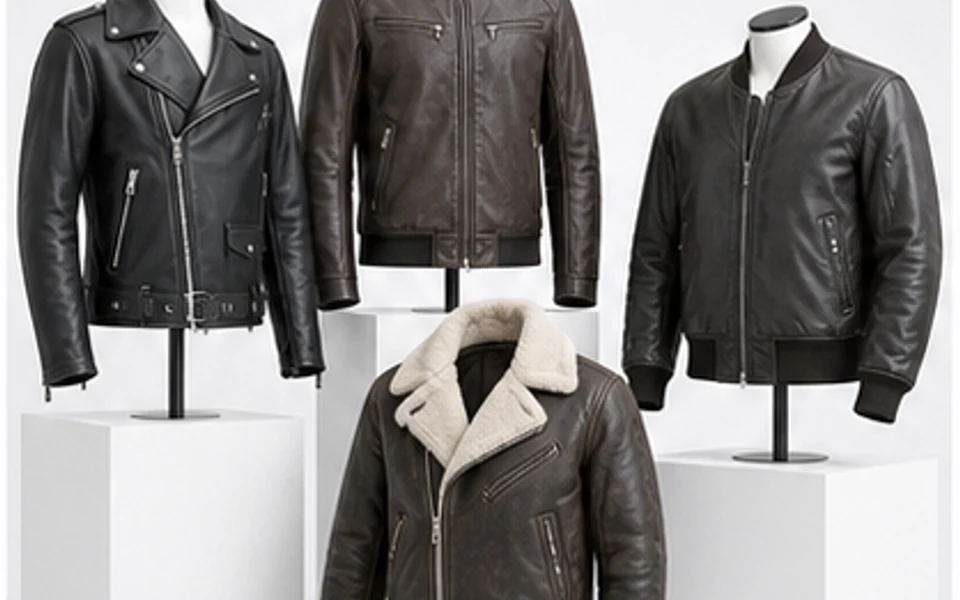
Leather wear is a premium category because buyers judge more than silhouette. A jacket, vest, trench, blazer, leather pant, moto piece, biker range, cafe racer, bomber, or private-label outerwear line has to communicate grain direction, finish, panel balance, zipper quality, snaps, lining, pocket placement, stitching, edge treatment, fit, color consistency, and brand positioning before the buyer touches a sample. This guide shows leather wear manufacturers and exporters how to use Ayzelify to build premium catalog presentation assets while keeping leather composition, origin, hardware, durability, care, and compliance language under human review.
Create premium leather catalog assets
Why this matters
Premium leather catalog presentation starts with product truth: jacket type, material wording, finish, lining, hardware, stitching, pocket layout, size range, and intended buyer.
Ayzelify helps leather teams create product concepts, model photoshoot directions, clean catalog views, texture closeups, listing copy, ad hooks, buyer decks, and tech-pack review notes from one structured brief.
Google helpful-content guidance rewards useful pages created for people, so a leather catalog article or product page should answer real buyer questions rather than repeating broad AI content claims.
Google image SEO guidance emphasizes relevant image context, descriptive filenames, alt text, and captions. Leather pages benefit when each image explains a visible product detail instead of acting as decoration.
Google structured data guidance says markup should represent the visible page content. For leather wear, images, copy, variants, product data, and schema should not disagree about the same SKU.
FTC leather guidance makes leather wording a review field. If a product appears to be leather but includes imitation, coated, bonded, or non-leather parts, the selling copy should not let generated imagery imply an unsupported material claim.
Practical guide
Start with the leather product truth before the photoshoot style
Premium leather catalog presentation begins before image generation. The team needs to define whether the product is a biker jacket, perfecto, cafe racer, bomber, aviator, trucker, hooded jacket, trench, blazer, vest, leather pant, moto piece, long coat, or another outerwear style. Each category has its own visual expectations: zipper angle, collar shape, shoulder structure, sleeve length, waist shape, pocket map, back panels, cuff treatment, hem finish, and model posture.
Ayzelify works best when the visual brief separates confirmed product facts from direction. If the product is full grain, top grain, split leather, suede, nubuck, bonded leather, coated leather, imitation leather, PU, PVC, faux leather, vegan leather, or mixed material, that wording should come from supplier documentation. The generated image can make a jacket look premium, but it should never decide the material claim for the catalog.
Build a premium catalog gallery around buyer inspection
Leather buyers often inspect a catalog like they would inspect a sample. They want to understand how the front closes, how the back is paneled, where the pockets sit, whether the collar feels structured, how the cuffs finish, and how the garment shape changes when it is open, closed, flat, or worn. A single dramatic campaign image does not answer those questions.
A stronger Ayzelify workflow creates an inspection set: clean hero, front, back, side, three-quarter view, open-front lining view, model fit, product-only ghost or hanger view, texture closeup, zipper macro, snap detail, pocket closeup, cuff, hem, collar, label, and packaging. This image order supports ecommerce SEO, answer-engine summaries, marketplace upload, and buyer-deck scanning because each asset has a clear job.
Show texture without turning appearance into a material claim
Leather texture is powerful in product marketing because grain, sheen, nap, embossing, distressing, quilting, perforation, and edge treatment change perceived value. Detail images should show the surface direction clearly, but the copy has to stay disciplined. A generated texture closeup does not prove full-grain leather, top-grain leather, suede, nubuck, hand waxing, vegetable tanning, water resistance, or abrasion performance.
This is where the catalog workflow becomes a review system. Let Ayzelify generate the closeups and premium presentation directions, then mark every sensitive claim as confirmed, pending, or removed. For U.S.-facing selling copy, FTC leather guidance is a useful reminder that leather and imitation-leather descriptions should not mislead buyers about composition. The practical rule is simple: the image may inspire the direction, but supplier facts should control public wording.
Make model photos explain fit, scale, and premium positioning
Model imagery is especially useful for leather wear because fit changes the whole product story. A cafe racer should show shoulder line, chest ease, sleeve length, collar height, zipper placement, and waist shape. A bomber should show volume at the body, rib or leather hem behavior, sleeve attitude, pocket access, and how the jacket sits open or zipped. A trench or long coat needs length, drape, belt logic, lapel shape, and movement.
Use Ayzelify model photoshoot directions to test the commercial level: clean ecommerce model, export catalog, premium lookbook, motorcycle lifestyle, luxury studio, casual streetwear, or marketplace white background. Then review the output for realistic body proportion, size communication, garment scale, styling accuracy, and whether the model shot could mislead buyers about the real product. The best leather catalog often combines model fit with product-only inspection images so beauty and clarity work together.
Connect listing copy, structured data, and image context
Search and AI discovery depend on consistency. Google helpful-content guidance points toward useful content made for real people, not pages built only to manipulate rankings. Google image guidance also favors images with relevant surrounding context, descriptive filenames, titles, captions, and alt text. For leather wear, that means an image of a zipper should be explained as a zipper, snap, puller, storm flap, or closure detail rather than stuffed with a broad keyword.
Product structured data has the same operational discipline. The title, description, visible page copy, image gallery, variants, availability, price fields, product feed, and schema should describe the same item. If a page is for a black cafe racer jacket with polyester lining and antique brass hardware, the gallery and copy should not drift into a different jacket, a different leather wording, or an unsupported hardware brand. Ayzelify can draft the copy fast, but the final ecommerce page should be checked like a product data handoff.
Use Ayzelify as the bridge from premium visuals to production review
A leather manufacturer does not only need attractive images. The approved direction has to move into a buyer presentation, marketplace listing, Shopify product page, internal sampling notes, and production review. After the visual direction is selected, the team should capture shell material, lining, interlining, panel layout, zipper lengths, snap placement, thread direction, pocket construction, labels, care notes, packaging, MOQ context, size grading, measurement tolerance, and QC checkpoints.
That is where Ayzelify becomes more than a photoshoot tool. Collection Studio can help organize product directions, Product Design Generator can test new concepts, Photoshoot Studio can build catalog and model views, Product Listing Generator can structure the copy, Marketing Forge can turn approved product facts into campaigns, and tech-pack review can keep the factory handoff grounded. The result is a premium catalog system that improves speed without sacrificing the product honesty leather buyers need.
Common questions
What should a leather wear catalog presentation include?
A strong leather catalog presentation includes a clean hero image, front, back, side, three-quarter view, model fit, lining view, texture closeup, zipper and snap macro, stitch detail, pocket detail, cuff and collar views, packaging, reviewed product facts, and buyer-ready listing copy.
How can Ayzelify help leather wear manufacturers?
Ayzelify helps leather teams turn a structured product brief into concept visuals, premium catalog images, model or ghost-mannequin photoshoot directions, detail views, ecommerce copy, marketplace listings, buyer-deck assets, and production-review checklists.
Can AI-generated leather product images prove leather quality?
No. Generated images can show visual direction and buyer-review context, but leather grade, genuine leather wording, finish, thickness, tanning method, hardware brand, origin, care, waterproofing, and durability claims need verified product evidence.
Which leather details deserve closeup images?
Useful closeups show grain, finish, stitching, zipper, snap, puller, pocket, lining, label, cuff, collar, hem, edge treatment, personalization area, packaging, and any visible construction detail that changes buyer confidence.