Ayzelify home
Guide page
Etsy Product Photos: What Buyers Need to See Before They Click Buy
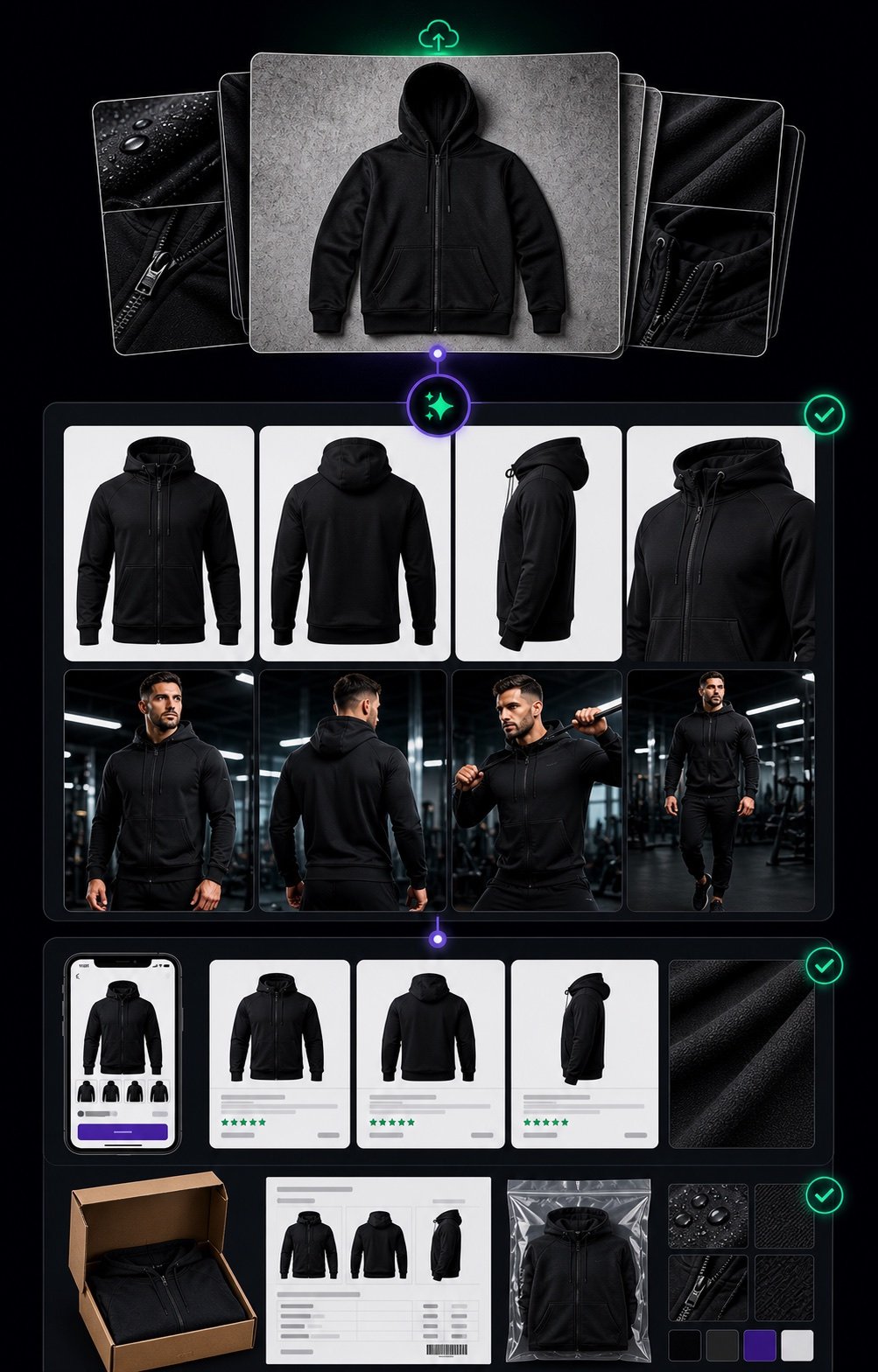
Etsy product photos have to answer buyer questions before the buyer reads every line of the listing. A shopper scanning search results needs to understand what the item is, why it looks trustworthy, and whether it is worth clicking. After the click, the rest of the gallery has to prove size, material, color, detail, variation, use context, personalization, and packaging without creating confusion. Etsy's current seller guidance emphasizes clear, high-resolution listing images, a singular finished-product primary photo, and detailed alt text for accessibility and search. This guide turns that into a practical photo sequence Etsy sellers can prepare with Ayzelify: first photo, alternate view, detail closeup, scale image, material or color proof, lifestyle/use-context, and a final support image for sizing, personalization, packaging, or buyer confidence.
Create Etsy product photos
Short answer
A useful Etsy product photo set should show a clear finished-product first photo, at least one alternate angle, a detail closeup, a scale or size reference, material or color proof, variation clarity when relevant, and a lifestyle, packaging, personalization, or sizing support image. Each image should match the title, tags, description, attributes, and alt text before the listing goes live.
Why this matters
The first Etsy photo should earn the click by showing one clear finished product, well lit, without collage clutter or misleading props.
The rest of the gallery should reduce risk: buyers need detail, scale, material, color, variation, personalization, packaging, and use-context evidence before checkout.
Every image should support the same product truth as the title, tags, description, attributes, price, processing time, and shipping promise.
Alt text should describe what the image shows for accessibility and search, not repeat keyword lists that are already present elsewhere in the listing.
Ayzelify can help sellers create a reviewable photo and listing-content plan, but sellers must verify product facts, marketplace policy, materials, dimensions, personalization rules, and fulfillment claims before publishing.
Practical guide
Make the first photo earn the click
The first Etsy photo is not a mood board. It is the buyer's first test of whether the listing is relevant, trustworthy, and worth opening. It should show one finished product clearly, with enough light and crop discipline that the item is readable at search-result size.
Etsy's current help guidance recommends listing images at 2000 pixels or more in width and height, and its Search Visibility guidance calls out clear, well-lit primary photos that show a singular finished product. That makes the first image a product-identification job before it is a styling job.
Ayzelify should be used here to create a clean product-first visual direction, then the seller should compare it with the real item, selected variation, and listing title before upload.
Use detail images to prove what buyers cannot touch
Etsy buyers cannot feel the fabric, inspect the clasp, hold the mug, test the leather grain, or see the embroidery depth. Detail photos have to do that work. A closeup should prove one visible fact: texture, stitching, print quality, engraving, hardware, finish, edge, lining, label, closure, or craftsmanship.
Generic closeups are weak. Strong detail images connect directly to the description: if the listing says hand-embroidered cotton, show the embroidery and fabric texture. If the listing says stainless steel hardware, show the hardware clearly and keep the material claim accurate.
This is also where sellers should avoid overclaiming. Do not use generated detail images to imply materials, certifications, handmade steps, packaging, or durability that the actual product does not have.
Show scale before buyers have to ask
Many Etsy returns, messages, and abandoned carts start with uncertainty about size. Scale photos help buyers understand how large the item is, how it fits, where it sits in a room, how it looks on a person, or which variation they are choosing.
Scale can come from a model, room scene, hand reference, measurement overlay, size chart, packaging view, or comparison image. The important rule is accuracy. A wall-art mockup, ring-on-hand photo, hoodie fit shot, or bag-on-shoulder image should not make the item look larger, smaller, softer, heavier, or more premium than it is.
Ayzelify can turn a product brief into scale-image direction, but final measurements and fit notes should come from the seller's real product data.
Clarify material, color, variation, and personalization
Etsy shoppers often compare variants quickly. If a product has colors, sizes, finishes, personalization, bundles, digital options, or made-to-order choices, the image set should make those options understandable.
Use controlled variation images instead of mixing random examples. Show color swatches, material boards, personalized name areas, engraving placement, print zones, fabric texture, packaging choices, or size options only when they are available to the buyer.
The listing title, attributes, personalization field, variation menu, and description should all match the image set. If the image shows gold hardware, the variation should not default to silver. If the mockup shows gift packaging, the listing should explain whether that packaging is included.
Connect every photo to listing SEO and answer-engine clarity
Photos do not work alone. Etsy's own alt text guidance recommends describing visible details, texture, and scale, while Google Search Central's product guidance connects representative, crawlable product images to product structured data and richer search experiences.
That means the image, alt text, title, tags, description, attributes, and product page markup should describe the same item in plain language. A buyer, Etsy search, Google Images, and an answer engine should all see a consistent product story.
Ayzelify is most useful when one product brief drives the photo plan and the listing copy together. Generate the set, then perform a seller review for factual accuracy, policy fit, and upload readiness.
Common questions
How many photos should an Etsy listing have?
Etsy allows sellers to add multiple photos, and a stronger listing usually uses the gallery to answer different buyer questions: first photo, angle, detail, scale, material or color, variation, lifestyle, sizing, personalization, packaging, or care context. The goal is not more images for their own sake; each photo should remove a buyer doubt.
What should the first Etsy product photo show?
The first photo should show a single finished product clearly, with good lighting and no confusing collage treatment. It should match the title, category, selected variant, and main buyer expectation because it has to earn the search-result click.
Do Etsy product photos need scale images?
Scale images are useful when size affects buyer confidence. Jewelry, wall art, apparel, bags, home decor, packaging, and personalized products often benefit from a model, room setting, hand reference, measurement visual, or size chart.
Can AI create Etsy product photos?
AI can help create or plan product visuals, listing copy, alt text, and supporting images, but the seller must verify that every generated image accurately represents the real product, materials, color, size, personalization option, and fulfillment promise.