Ayzelify home
Guide page
Material Studio Guide: Fabrics, Labels, Hangtags, and Packaging Boards
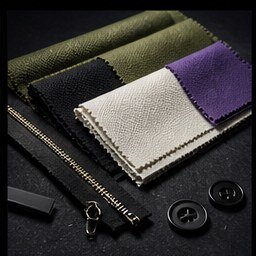
Material choices are often discussed too late. A buyer may approve a product concept, then ask for fabric options, label direction, hangtag style, packaging, print method, and quotation details in separate messages. That slows sampling and makes the supplier look less organized. Material Studio gives exporters and clothing brands a way to turn manufacturing choices into visual boards before production starts. Instead of describing cotton fleece, woven labels, foil hangtags, kraft packaging, or sublimation only in text, teams can create reviewable swatchbook-style assets that help buyers understand what they are choosing. The output is not a replacement for physical samples, lab testing, or supplier verification, but it gives the sales, design, and production team a clearer visual brief before they spend time and money on sampling.
Create material boards
Short answer
Material Studio helps exporters and clothing brands create visual material boards for fabrics, print methods, woven labels, hangtags, and packaging so buyers can review manufacturing direction before sampling. The best workflow starts with real product facts, selects accurate materials and trims, generates a buyer-facing board, then reviews every material, color, logo, packaging, and production claim before using it in listings, catalogs, tech packs, or quotations.
Why this matters
Material boards make manufacturing choices visible. Buyers can compare fabric families, decoration methods, labels, hangtags, and packaging as a planned system instead of approving each detail through scattered messages.
Ayzelify Material Studio is grounded in product workflow data: a fabric catalog, decoration catalog, label options, hangtag styles, packaging choices, brand color inputs, logo upload, and background job generation for swatchbook assets.
A useful board should separate design direction from production truth. It can show the intended look, but the team still needs to confirm GSM, composition, MOQ, supplier availability, color matching, artwork limits, packaging dimensions, and compliance requirements before production.
For SEO and GEO, material information should become crawlable product content. Accurate fabric, label, packaging, and care-context language helps product pages, listings, catalogs, and AI answer systems understand the offer more clearly.
Material Studio works best when it connects to Brand Studio, Product Listing, Tech Pack, and Automated Launch workflows so one approved direction can influence buyer visuals, listing copy, quotation assets, and manufacturing handoff.
Practical guide
Use material boards to reduce buyer uncertainty
A buyer rarely evaluates only the front image of a garment. They ask what the fabric feels like, which print method is possible, where the label goes, how the hangtag looks, and what packaging comes with the order.
When those choices live in separate chats, the offer feels unfinished. A material board makes the manufacturing direction visible in one place: fabric, decoration, label, hangtag, packaging, brand color, and buyer-facing notes.
For exporters, this is a sales tool and an operations tool. It gives buyers something clearer to approve and gives production teams a better starting point for sampling.
Select fabrics and trims from real product context
Material Studio should start from the product category and buyer expectation. A streetwear hoodie, running tee, hunting jacket, leather outerwear piece, and teamwear jersey all need different fabric logic.
The current Ayzelify source includes a generated fabric catalog with 333 entries across streetwear, techwear, hunting, sportswear, and leather outerwear. That gives teams a practical starting point for fabric direction, but it still has to be checked against the supplier's actual sourcing options.
The review step is essential. Confirm GSM, fiber composition, stretch, coating, hand feel, noise, color availability, and whether the chosen material fits the target price before using it in a quotation.
Make labels and hangtags part of the brand system
Labels and hangtags are small, but they change how buyers read the product. Woven neck labels, hem labels, care labels, leather patches, foil hangtags, kraft cards, and premium tag strings all signal different price and brand positions.
Material Studio includes label and hangtag modes so teams can visualize those decisions with the brand name, logo, color direction, and product metadata context. This is useful before the team orders trims or prepares packaging artwork.
The board should not invent final print files. Treat it as a direction asset, then check dimensions, fold type, material, color count, barcode needs, country-of-origin wording, care content, and legal requirements before production.
Show packaging before the buyer asks for it
Packaging is often treated as a final shipping detail, but buyers may care about it much earlier. A marketplace seller wants to know the unboxing look. A distributor wants carton logic. A private-label buyer wants branded bags, boxes, stickers, and hangtags to feel consistent.
Material Studio packaging boards can help show the direction: mailer, rigid box, drawer box, magnetic box, eco packaging, tote-bag packaging, or other presentation styles. The point is to make the offer concrete before the quote conversation becomes vague.
Before publishing or quoting, confirm packaging dimensions, unit count, carton quantity, artwork method, minimum order quantity, cost impact, and whether the packaging meets the buyer's shipping and marketplace needs.
Turn approved boards into crawlable product content
A material board is most valuable when its facts become usable content. Product pages and listings should describe verified material composition, construction, decoration method, packaging, customization options, care context, and review notes in crawlable text, not only inside images.
Google Search Central explains that ecommerce structured data can improve how Google understands product content, and Merchant Center guidance emphasizes accurate product data. For exporters, that means material claims should be specific, consistent, and supported by real product information.
Use the board to improve the first draft, then separate visual direction from confirmed facts. Search visibility, buyer trust, and production accuracy all depend on not overstating what the factory can actually make.
Common questions
What does Material Studio create?
Material Studio creates reviewable fabric, print, label, hangtag, and packaging visuals. Teams can use those assets as material boards, swatchbook-style presentations, listing support, quotation attachments, or tech-pack planning references.
Can a material board replace a physical fabric sample?
No. A material board helps buyers understand direction before sampling, but physical samples, lab dips, supplier confirmation, test reports, and production approvals are still needed when texture, color, performance, or compliance matters.
Why should exporters show labels, hangtags, and packaging early?
Labels, hangtags, and packaging affect brand perception, pricing, MOQ, lead time, and buyer trust. Showing them early helps buyers understand the complete product offer instead of only seeing the garment or item.
How does Material Studio help product listings?
It gives teams visual and textual direction for materials, trims, decoration methods, labels, packaging, and customization options. Those details can become clearer listing copy after the team reviews the real product facts.