What does Automated Launch create in Ayzelify?
Automated Launch is positioned as a compact workflow that starts after product assets exist and creates a basic launch kit, including a listing draft, tech-pack foundation, and social post draft.
Guide page
A small product team can lose momentum after the first usable product asset is ready. The photo, mockup, or generated product view may be approved, but the team still needs listing copy, production notes, launch messaging, and a social post that all describe the same item. Automated Launch helps founders and lean ecommerce teams move from one reviewed product asset into a basic launch kit: product listing draft, tech-pack foundation, and social post handoff in one connected flow.
Automated Launch should start with one reviewed product asset and a verified product brief, then generate a listing draft, tech-pack foundation, and social post draft from the same source of truth. The team should review product claims, measurements, materials, MOQ, price, production details, image accuracy, destination links, and publishing permissions before treating any generated output as final.
Automated Launch is useful after the product asset exists, not before the team knows what product it is launching.
The workflow should keep one source brief for product facts, approved image, audience, offer, production notes, and review constraints.
The listing draft, tech-pack foundation, and social post should use the same product truth so buyers, factories, and followers do not see conflicting details.
For SEO and GEO, the launch kit should support crawlable product pages, descriptive images, internal links, clear titles, useful summaries, and structured content rather than thin duplicated copy.
The final step is approval. Generated launch assets are drafts until a human checks product accuracy, factory readiness, listing claims, connected account status, and the destination page.
Automated Launch works best when the team already has a product asset it trusts. That may be a generated product view, product photo, catalog image, mannequin shot, or concept render that accurately represents the item being launched.
The asset should be checked before the launch workflow starts. Confirm the visible product, color, logo placement, trims, proportion, material direction, variant, and selling context. A weak source image creates weak downstream copy and factory notes.
For small teams, this gate matters because the same product truth will move into buyer-facing listing copy, production-facing tech-pack notes, and social launch messaging.
A launch kit breaks when each output is written from a different prompt. The listing may mention one material, the tech-pack notes may imply another, and the social post may promote a claim the product owner never approved.
Create one source brief with product name, category, buyer, use case, materials, sizes, colors, offer, CTA, marketplace or store destination, production notes, and restricted claims. That brief becomes the reference for the full Automated Launch sequence.
Google's Search Essentials emphasize helpful, reliable, people-first content, clear words users would search for, and crawlable links. A single source brief supports that standard because it keeps the page, image context, and internal links coherent.
The product listing is usually the commercial center of the launch kit. It needs the title, description, buyer-facing benefits, product specifications, variant notes, image guidance, SEO fields, and destination-page context.
For ecommerce search visibility, the listing should make the product easy to understand. Google Search Central's ecommerce guidance describes product structured data and product feeds as ways to help Google understand product information, while image SEO guidance recommends descriptive context around images.
Ayzelify's Listing Generator can create marketplace and ecommerce listing drafts, but the seller still owns the final truth. Pricing, stock, shipping, MOQ, materials, and certifications should be verified before anything is published.
A listing speaks to buyers. A tech pack speaks to production. Automated Launch should not confuse the two, but it should reuse the same source product facts so the factory-facing handoff reflects the item being sold.
The tech-pack foundation should include product information, measurement assumptions, size notes, bill of materials, trims, embellishments, construction notes, customization requests, and QC checks. For apparel, these details help the next sampling or quotation step happen with fewer missing facts.
This output still needs human production review. A generated tech pack can organize the handoff, but it cannot certify fit, tolerance, fabric performance, compliance, or factory capability on its own.
The social post should not restart the launch from a blank caption prompt. It should use the same product name, offer, audience, product facts, and destination link used in the listing and tech-pack review.
For founders and small teams, this prevents a common launch problem: the post creates attention, but the product page or marketplace listing tells a different story. Keep the CTA simple and route it to the correct listing, catalog page, store, or quote form.
Use Social Studio for platform-specific caption drafts, then approve the copy separately from publishing. Connected account status, OAuth permissions, platform support, and final seller action still decide whether a post actually goes live.
Use Ayzelify Automated Launch to create a listing draft, tech-pack foundation, and social post from one reviewed product source, then approve the details before publishing, quoting, sampling, or promoting.
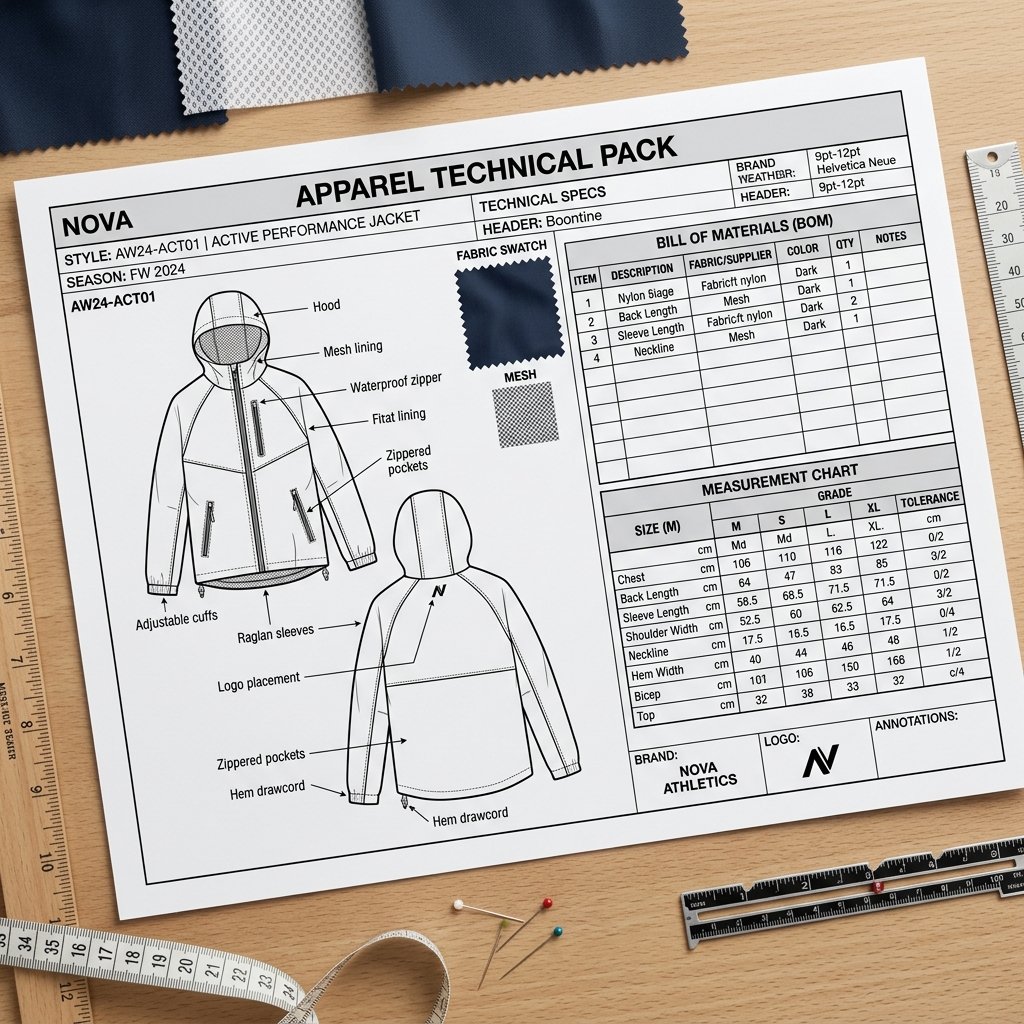
Automated Launch is positioned as a compact workflow that starts after product assets exist and creates a basic launch kit, including a listing draft, tech-pack foundation, and social post draft.
One brief keeps the product facts aligned. The listing, factory handoff, and social post should describe the same product, materials, variants, offer, CTA, and review constraints.
No. It can create a useful tech-pack foundation, but measurements, tolerances, BOM, construction details, compliance notes, and factory feasibility still need human production review.
It should be treated as a draft until the seller verifies product facts, pricing, availability, shipping, claims, destination links, marketplace rules, and connected publishing status.
Use Ayzelify to generate product visuals, ecommerce content, and buyer-ready assets, then review every output before publishing.